Embed a message
Show one of your voice messages on your website – with player, text and your landing page.
A greeting from the boss on the home page, an explanation next to the offer, a thank-you after the purchase – anything you record can go on your website.
How it works
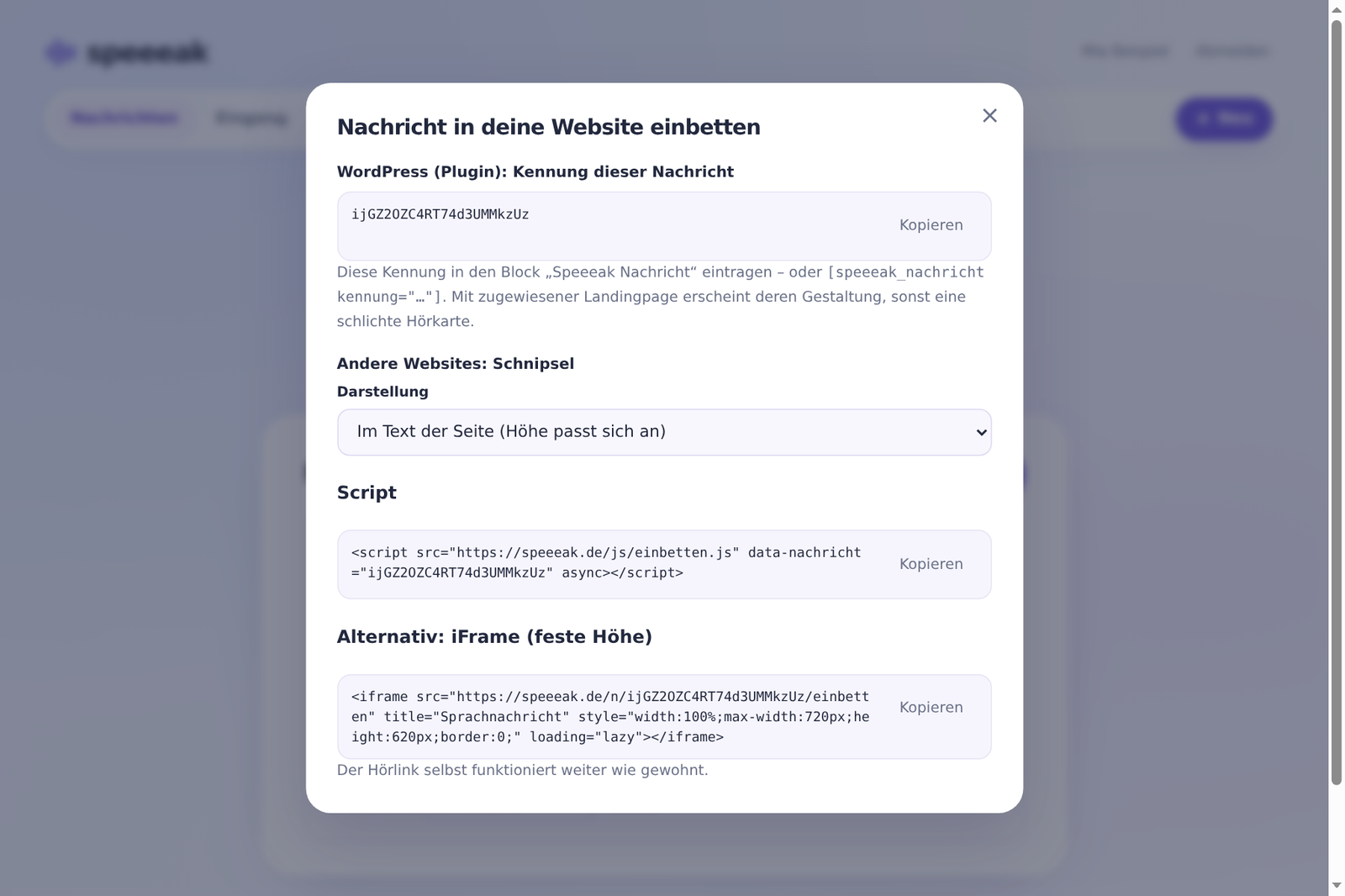
- Account → Messages → “Embed” next to the message.
- At the top of the window you'll see “WordPress (plugin): ID of this message” → Copy. (For WordPress that's all you need – plugin guide.)
- For other websites: choose the display style (inline or floating) and copy the snippet → paste it into your page.
What is shown
The embedded message uses the landing page you assigned to it – colours, logo, photo, buttons, footer. Without a landing page, a plain voice card in Speeeak purple appears. Under Design a landing page you define what is shown: header with name, heading, subline, photo, “Save audio”, “Available until”, “Servers in the EU”, privacy link, Speeeak note – each can be switched on or off individually.
Snippets (without WordPress)
Inline in the text of the page, height adjusts automatically:
<script src="https://speeeak.io/js/einbetten.js" data-nachricht="MESSAGE-ID" async></script>
Floating, as a tab on the left edge:
<script src="https://speeeak.io/js/einbetten.js" data-nachricht="MESSAGE-ID"
  data-art="lasche" data-text="Listen to the message" data-position="links" data-farbe="#6751df" async></script>
Without JavaScript (fixed height):
<iframe src="https://speeeak.io/n/MESSAGE-ID/einbetten" title="Voice message"
  style="width:100%;max-width:720px;height:620px;border:0" loading="lazy"></iframe>
All display styles and parameters: Display styles.
💡 Tip: If the message expires or you delete it, the embedded spot shows a discreet note instead of an empty frame. Messages with Plus stay for 30 days – for permanent content, re-upload the message in time or ask us about a longer runtime.